Smart Cabinet Door Lock Keyless Invisible Electronic Lock IC Card TTlock App Unlock Cabinet Locker Furniture Drawer Smart Locks
2card 2keyforb
€20,95
سعر البيع
€20,95
السعر الاعتيادي
Skip to product information

2,TTlockLOCK(TTLOCK APP UNLOCK ):


Smart Cabinet Door Lock Keyless Invisible Electronic Lock IC Card TTlock App Unlock Cabinet Locker Furniture Drawer Smart Locks
€20,95
سعر البيع
€20,95
السعر الاعتيادي
الضرائب مشمولة.
سيتم احتساب رسوم الشحن عند إتمام الشراء.
SPECIFICATIONS
Brand Name: NONE
Connectivity: Bluetooth
High-concerned chemical: none
Origin: Mainland China
Power Supply: DRY BATTERY
Scope of application: Home Office Drawer Gym Foot Bath Room
Smart home platform: alexa,Google Assistant
Special Features: Support Gateway
Suitable Door Type: Wooden Door
Ways To Unlock: CARD,App
material: plastic steel
model: Universal locker
style: modern minimalist
There are 2 kinds of locks . The commonality is that they can lock and open doors. The difference is different ways of unlocking.
1,Basic LOCK(NO APP FUNCTION):
UNLOCK WAYS:IC card +keyforb unlock,for drawer cabinet door
2,TTlockLOCK(TTLOCK APP UNLOCK ):
UNLOCK WAYS:IC card +keyforb +ttlock APP +mobile phone NFC to unlock ,for drawer cabinet door . TTlock style lock needs to use the mobile phone ttlock APP to add a key before the key can be unlocked
Please note that:
1. The basic lock (not ttlock) has external power connections, and the maximum capacity of card+keyfob is 15
2. The ttlock lock does not have external power connections, and the maximum capacity of the card+keyfob is 200
3. With the assistance of ttlcok gateway, ttlock can work together with Google Home or Alexa to achieve voice control
4. An external power supply unit can be purchased separately, and 4 AA batteries can be used for one year
Features:
1. The card sensing distance can reach 5cm, The sensing distance of the key chain is about 3cm,which is suitable for most door thicknesses
2, low battery prompt, when the battery power is low, it will prompt,If the battery runs out of charge, the locking tab will automatically pop open
3. 8.5mm stainless steel solid lock tongue, high safety factor
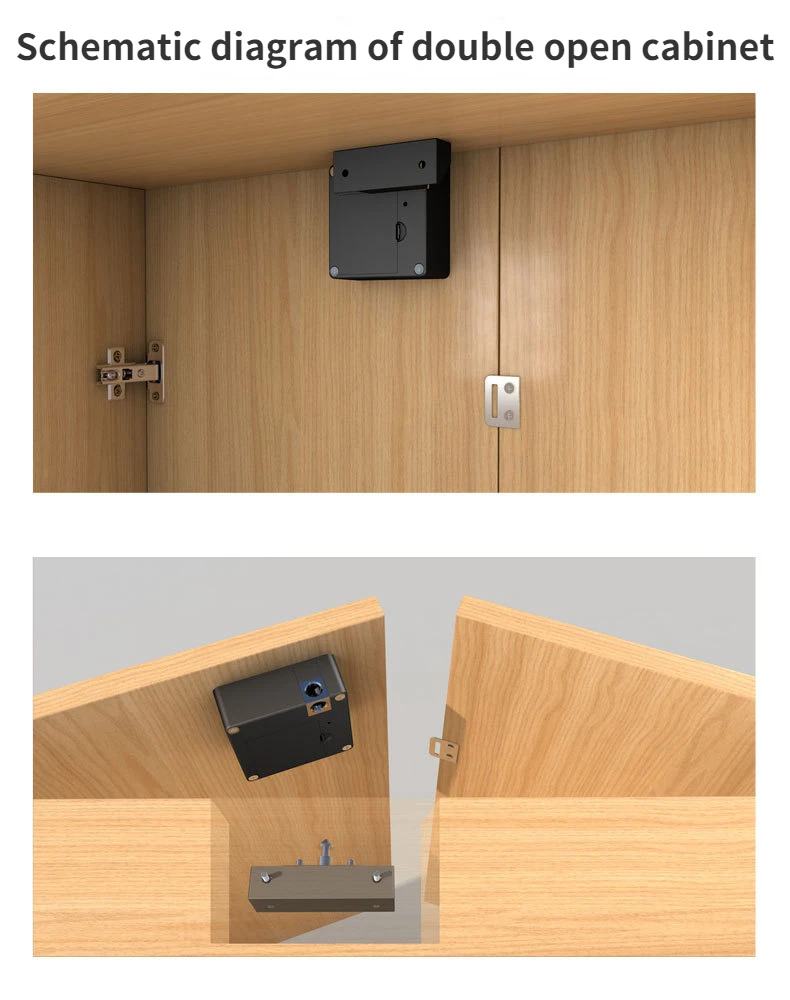
4. Suitable for drawers, doors, etc. without baffles or double boards
size:
Lock body: 7.5*7.5*3.0cm/3.0*3.0*1.2in
Door frame: 7*3.6*2.5cm/2.8*1.4*1.0in
IC card: 8.5*5.5cm/3.3*2.2in
Please note that:
1. The basic lock (not ttlock) has external power connections, and the maximum capacity of card+keyfob is 15
2. The ttlock lock does not have external power connections, and the maximum capacity of the card+keyfob is 200
3. With the assistance of ttlcok gateway, ttlock can work together with Google Home or Alexa to achieve voice control
4. An external power supply unit can be purchased separately, and 4 AA batteries can be used for one year
Features:
1. The card sensing distance can reach 5cm, The sensing distance of the key chain is about 3cm,which is suitable for most door thicknesses
2, low battery prompt, when the battery power is low, it will prompt,If the battery runs out of charge, the locking tab will automatically pop open
3. 8.5mm stainless steel solid lock tongue, high safety factor
4. Suitable for drawers, doors, etc. without baffles or double boards
size:
Lock body: 7.5*7.5*3.0cm/3.0*3.0*1.2in
Door frame: 7*3.6*2.5cm/2.8*1.4*1.0in
IC card: 8.5*5.5cm/3.3*2.2in
How to add an unlock card to a standard cabinet lock?
1. Correctly install 4 AA batteries, read the card close to the lock and hear a "beep", the management card is successfully set. And continue to add other cards within 5 seconds, you can match 13 cards in a row.
How to add an unlock card to a ttlock lock?
The ttlock version of the lock is different from the standard lock, the way to add the access card must be done through the ttlock app
1. Correctly install 4 AA alkaline batteries
2. Turn on the bluetooth of the mobile phone, identify the lock through the ttlock APP and add the lock 3. After the lock is added successfully, choose to add a key and name it, swipe the card with the key, and hear the sound of "di", the mobile phone recognition is successful, if the addition is completed. (You can set the key validity period)
The package includes:
1PC lock body
1PC door button
2PC 13.56Mhz IC card
2PC keyforb
1PC sensor sticker
1PC Mounting Screw Kit
OR
1PC TTLOCK lock body
1PC door button
2PC 13.56Mhz IC card
2PC keyforb
1PC sensor sticker
1PC Mounting Screw Kit
OR
1PC TT lock body
1PC door button
2PC 13.56Mhz IC card
5PC keyforb
1PC sensor sticker
1PC Mounting Screw Kit
OR
1PC lock body
1PC door button
2PC 13.56Mhz IC card
5PC keyforb
1PC sensor sticker
1PC Mounting Screw Kit
Notice:
1. Does not include battery, does not include charging device
2. Multiple IC cards or keychain can be purchased additionally

The ttlock version of the lock is different from the standard lock, the way to add the access card must be done through the ttlock app
1. Correctly install 4 AA alkaline batteries
2. Turn on the bluetooth of the mobile phone, identify the lock through the ttlock APP and add the lock 3. After the lock is added successfully, choose to add a key and name it, swipe the card with the key, and hear the sound of "di", the mobile phone recognition is successful, if the addition is completed. (You can set the key validity period)
The package includes:
1PC lock body
1PC door button
2PC 13.56Mhz IC card
2PC keyforb
1PC sensor sticker
1PC Mounting Screw Kit
OR
1PC TTLOCK lock body
1PC door button
2PC 13.56Mhz IC card
2PC keyforb
1PC sensor sticker
1PC Mounting Screw Kit
OR
1PC TT lock body
1PC door button
2PC 13.56Mhz IC card
5PC keyforb
1PC sensor sticker
1PC Mounting Screw Kit
OR
1PC lock body
1PC door button
2PC 13.56Mhz IC card
5PC keyforb
1PC sensor sticker
1PC Mounting Screw Kit
Notice:
1. Does not include battery, does not include charging device
2. Multiple IC cards or keychain can be purchased additionally