
For Phezer P17 Handheld Inkjet Printer 12.7mm Portable Date Code Expiry Batch Number Logo QR Barcode Label Maker 28 Languages
with 2 ink
€339,95
Sale price
€339,95
Regular price
Skip to product information


For Phezer P17 Handheld Inkjet Printer 12.7mm Portable Date Code Expiry Batch Number Logo QR Barcode Label Maker 28 Languages
€339,95
Sale price
€339,95
Regular price
Taxes included.
Shipping calculated at checkout.
SPECIFICATIONS
Battery: 10 hours of continuous
Brand Name: NONE,Phezer
Dimensions: 180*90*52
Display: 4.3 inch touch screen
Model Number: VC77
Origin: Mainland China
Print Area: 1-8 lines or unlimited
Print Height: 2-12.7mm
Print speed: 80meter/minute
barcode printer: expiry date printer
handheld inkjet printer: variable
handheld printer: print by hand
ink cartridge: print 800000
label printer: hand jet printer
mobile printer: portable printer
online TIJ printer: print automatically
plastic bottle printer: paper box printer
steel printer: cloth printer
wood printer: metal printer
Enhance your inventory management and product labeling efficiency with the Phezer P17 Handheld Inkjet Printer. This versatile device is designed for seamless integration into various industrial and commercial workflows, offering high-precision printing for dates, batch codes, logos, QR codes, and barcodes. It is perfectly suited for creating clear 12.7mm labels that ensure readability and compliance with industry standards.
The printer supports an impressive array of 28 languages, making it an ideal solution for global businesses and multinational operations. Whether you need to print expiry dates, serial numbers, or custom graphics, this handheld unit delivers , professional results every . Its ergonomic design ensures comfortable handling during extended use, while its portable nature allows for on-the-go labeling in warehouses, retail stores, or manufacturing floors.
Please note that this listing is for the Phezer P17 Handheld Inkjet Printer only. It is compatible with standard 12.7mm label tapes, providing flexibility for different packaging needs. The device features user-friendly controls, allowing operators to quickly input data and adjust settings without extensive training. From small businesses looking to streamline their coding processes to large enterprises requiring reliable batch tracking, this printer offers a cost-effective and durable solution. Ensure your products are accurately marked with essential information, enhancing traceability and customer trust. Upgrade your labeling capabilities today with this efficient and multilingual handheld printing solution.
Phezer P17 Handheld Inkjet Printer Date Number Expiry Date Logo QR Bar Batch Code Expiry Date 12.7mm Label Printer 28 Languages
Big advantage:
1: The machine is not encrypted, and the cost of ink cartridges is low. You can also buy cartridges
locally.
2: The printing height of this product is 12.7 mm, the printing efficiency is better, the speed is
faster, it is suitable for printing almost all materials such as carton, plastic bag, metal, etc., quick-
drying printing, not easy to fade
3: This machine supports 28 languages, and you can use U disk to import new fonts.
include:
1* Printer
1* Charger
1* Stylus Pen
1* Positioning metal plate
1* battery
1 * Ink (normal solvent quick drying) (delivered at the amount you pay)
1* English manual
Specification:
1,Print Head:Thermal inkjet 2.5
2,CPU:Quad core 1.4GHz
3,Operation System:Linux
4,Print Distance:Best quality with 2-5mm
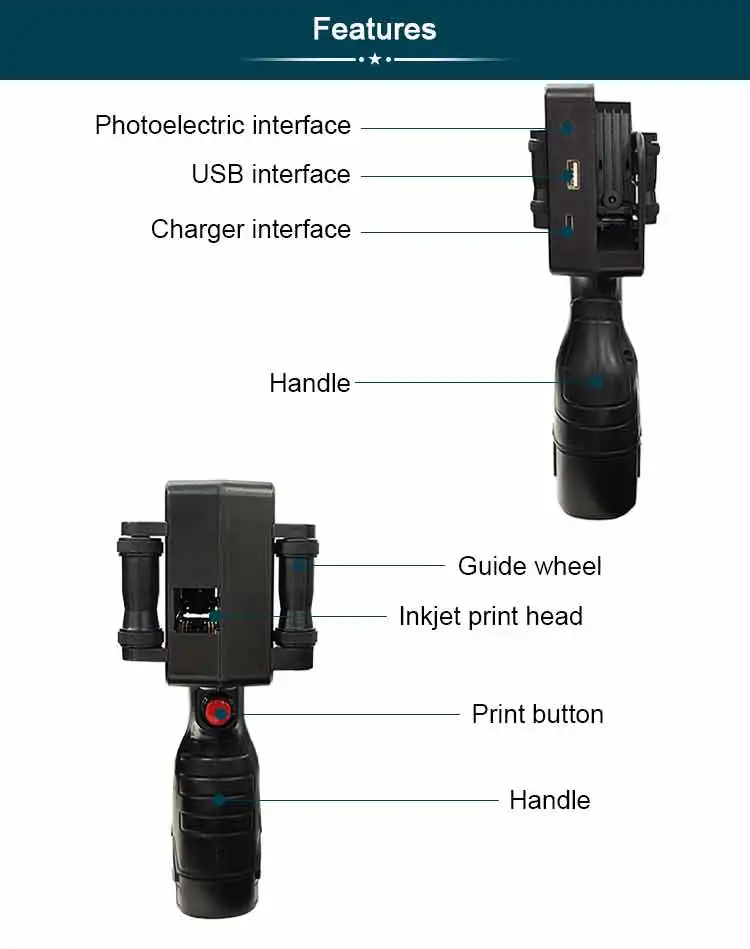
5,lnterface:USB,Photocell
6,Print Resolution:600dpi Maximum
7,Weight:Gw 0.42KG
8,Dimension:225*135*110mm
9,Battery:2200mAh @ 8.4V
10,Ink Type:Water-based/42ml,Solvent/42ml
11,Material of Printer:ABS+PC
12,Print Height:2-12.7mm
13,Language:Chinese, English, Japanese,Turkish,Arabic, Korean, Spanish, French, Italian and so
14,Adapter:AC input 100~240V; DC output 8.4V/2A
15,Ink Color:Black, White,Red, Yellow, Blue, Green, Invisible, UV
16,Print Content:Chinese,English, Numbers,Symbols, QR code, Bar code,Pictures, Dates,Counter
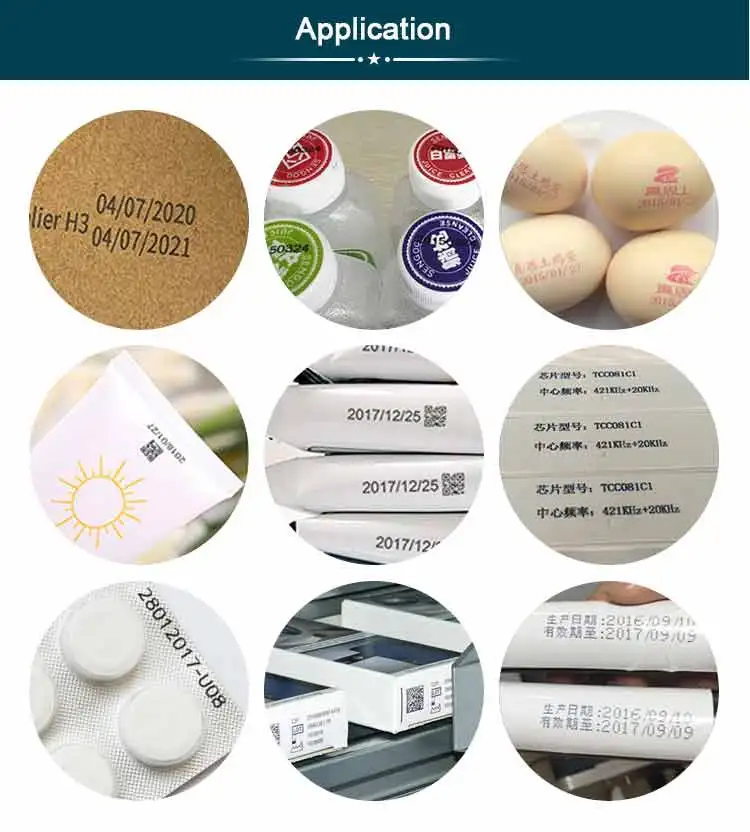
17,Print Media:Boards, Carton, Stone, Pipe,Cable, Metal, Plastic,Electronic,Automotive parts
18,Operational Environment:Temperature 0-45℃ (The best:20-30℃)Humidity 40%-60%Rh





Q & A
1.Q:How to better extend the life of the printer ?
A:Before installing and removing ink cartridges, be sure to turn off the printer.
2.Q:How to better protect the ink cartridge nozzle?
A:When not using ink cartridges, please close the protective cover in .
Dip a soft paper towel with a small amount of before use, and then gently wipe the nozzle in one direction.
3.Q: Why does the printer screen not work?
A: When you find that the screen of the printer is not working, please calibrate the screen of the printer.For specific steps please check this link :
4.Q: Can the printer be equipped with photoelectric sensors?
A: Yes, our inkjet printer has an adapted photoelectric sensor. Please consult customer service before purchasing.
5.Q: Can the printer print on the bottle?
A: Yes, we will provide you with a metal positioning plate for free, For specific steps,please consult customer service .
6.Q: What should I do if the printer cannot print?
A: ①Check whether the timing belt on the left side of the printer is off (not in the groove).
②Check if there is ink in the ink cartridge.
③Switch the nozzle of the printer in the settings.
④ After turning off the printer, reinstall the ink cartridge.
7.Q: The ink cartridge of the printer can print, but the printing is not clear, what should I do?
A: ①Check whether the ink cartridge nozzle is clean and dry, and wipe the nozzle carefully with a clean soft tissue.
② Take out the ink cartridge when the printer is off, shake the nozzle down several s, and stick a clean paper towel on the surface of the nozzle to divert the ink in the box.
③Switch the nozzle of the printer in the settings.
④The above operation still cannot be solved, please replace the ink cartridge.
8.Q: What should I do when there is a printer phenomenon of wire drawing?
A: The ink cartridge is quick-drying. When there is a phenomenon of wire drawing, please wipe the nozzle carefully with a clean soft tissue and switch the nozzle of the printer.
When not using the ink cartridge, please install the cover in .
9.Q: Can the printer be charged?
A: Yes. Note:
① Please remove the battery at the bottom of the printer and charge it separately to avoid damage to the printer.
②Please use our special charger to charge the printer.
③When the printer is stored for a long and not in use, it is recommended to safely charge and discharge it every three months.


